Dot Art Stamps for Procreate & Affinity
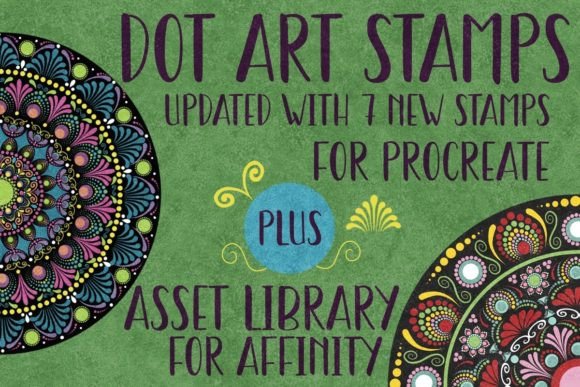
Digital creativity often hinges on the tools available to bring a sketch to life. For artists working on iPads or desktops, having a reliable set of hand-drawn elements can streamline the design process significantly. The Dot Art Updated Stamps and Asset Library offers exactly this: a curated collection of 23 unique stamps designed specifically for two of the most popular creative applications in the industry. Whether you are layering textures in an illustration or scaling logos for print, these assets provide a foundation that balances artistic charm with technical utility.
Bridging Two Creative Worlds
This collection is distinct because it caters to two different workflows without compromising quality. On one side, there is the Procreate file containing 23 opaque stamps. These are raster-based images hand-drawn to capture the nuance of traditional dot art. They are ready to be imported directly into Procreate on an iPad, where they function as flexible layers. Because they are opaque, they serve as a solid base for coloring, masking, or overlaying other effects. This makes them ideal for artists who need immediate visual impact without worrying about transparency issues.
On the other side lies the Affinity Designer Asset Library. This version contains the same 23 designs but converted into vector format. Vectors operate differently than the Procreate stamps; they are mathematically defined paths rather than fixed pixels. This means the assets in the Affinity library are infinitely scalable. You can enlarge a small dot pattern to cover a billboard or shrink it for a business card, and the lines will remain crisp and smooth. This duality ensures that the Dot Art Updated Stamps and Asset Library serves both pixel-perfect illustrators and precision-focused designers.
Why Beginners Value Simplicity and Speed
For those just starting their journey in digital art, the learning curve can sometimes feel steep. Beginners often struggle with creating complex patterns from scratch. The Dot Art Stamps offer a shortcut that feels authentic rather than automated. A new user can import these stamps into Procreate and immediately begin experimenting with composition. There is no need to master intricate brush settings to get a professional-looking result.
The practical value here is speed and confidence. A beginner might want to create a simple greeting card or a social media graphic. Instead of spending hours drawing individual dots, they can drag and drop a stamp, resize it, and move it around the canvas. The fact that the Procreate file is compatible only with the app on an iPad simplifies the setup; there are no complex installation steps or plugin configurations. It is a "download and go" experience that allows novices to focus on color theory and layout rather than technical hurdles.
Professional Efficiency and Commercial Viability
As users transition from hobbyists to professionals, priorities shift toward efficiency, scalability, and commercial rights. Designers and freelancers know that time is billable. When working on client projects, such as branding packages or packaging design, the ability to scale assets without losing resolution is non-negotiable. This is where the Affinity Designer Asset Library becomes essential.
A professional designer might use the vector versions of the Dot Art Stamps to create a logo mark or a repeating background for a website. Because the assets are vectors, they can be manipulated within Affinity Designer to fit exact dimensions required by a printer or a web developer. The hand-drawn nature of the original art adds a human touch that generic geometric shapes lack, which is often a selling point for boutique brands looking for a unique identity.
Furthermore, the commercial license included with these assets allows professionals to use them in paid projects. Whether it is for print-on-demand merchandise, marketing materials, or editorial illustrations, the flexibility to use these assets commercially expands their utility beyond personal experimentation. The reliability of the file formats ensures that projects meet industry standards, reducing the risk of technical errors during the final production phase.
Crafters, Educators, and Content Creators
The audience for digital art tools extends far beyond professional studios. Scrapbookers, educators, and content creators also find significant value in this library. For scrapbookers moving into digital planning, the opaque nature of the Procreate stamps allows for easy integration into photo collages. They can place a dot art element over a photograph to add texture or frame a memory without obscuring the image underneath.
Educators teaching digital literacy or art classes can use these assets to demonstrate layering techniques. By providing students with pre-made high-quality elements, teachers can focus the lesson on how to manipulate those elements—changing colors, blending modes, and opacity—rather than getting bogged down in the mechanics of drawing. It levels the playing field, allowing students of varying skill levels to produce impressive work.
Bloggers and marketers often need consistent visual themes for their content. The 23 unique stamps provide enough variety to keep a feed interesting while maintaining a cohesive style. A blogger might use the same dot art motif across their blog headers, Pinterest pins, and Instagram stories to build brand recognition. The ease of importing these files directly into their preferred software means they can maintain a consistent output schedule without needing to commission custom art for every post.
Evaluating Your Needs: Which Version Do You Need?
Deciding whether to utilize the Procreate stamps or the Affinity Designer assets depends largely on your hardware and end goal. If your primary workflow is on an iPad with an Apple Pencil, the Procreate version is your best choice. It is optimized for touch interaction and integrates seamlessly with the app's gesture controls. However, remember that this file is strictly for Procreate; it cannot be opened in other applications.
Conversely, if you require precise control over line weight, need to edit the shape of the dots, or plan to scale the artwork to very large sizes, the Affinity Designer Asset Library is the superior option. Its vector nature offers a level of flexibility that raster images cannot match. While the Procreate stamps are excellent for quick illustration and painting, the Affinity assets are built for technical precision and long-term adaptability.
Ultimately, the Dot Art Updated Stamps and Asset Library is more than just a set of graphics; it is a toolset designed to respect the diverse needs of the modern creator. From the casual hobbyist looking to spice up a weekend project to the enterprise-level designer managing a global campaign, these assets provide a versatile foundation. By understanding the specific strengths of each file type, you can choose the right resources to match your project's demands, ensuring your creative vision is realized with clarity and style.