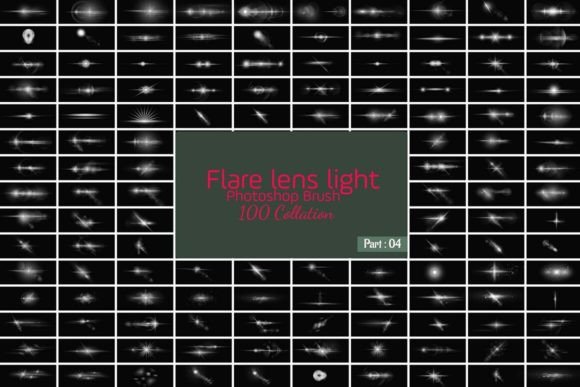
Evaluating the Photoshop 100 Brush Lens Bundle for Digital Design
In the realm of digital photography and graphic design, lighting effects play a pivotal role in establishing mood, depth, and visual interest. The Photoshop 100 Brush Lens Bundle represents a collection of digital assets designed to simulate optical phenomena, specifically lens flares and light leaks. For designers and photographers seeking to enhance their compositions without relying solely on complex manual rendering techniques, this bundle offers a streamlined workflow. Understanding the utility, limitations, and appropriate applications of such tools is essential for making an informed decision about integrating them into your creative toolkit.
Understanding the Core Functionality
At its foundation, this product provides one hundred distinct brush presets formatted for Adobe Photoshop. These brushes are engineered to replicate the aesthetic qualities of light interacting with camera lenses. Unlike static image overlays, brush-based assets offer dynamic control. Users can paint light effects directly onto their canvases, allowing for precise placement and scaling. The inclusion of transparency controls means that each stroke can be adjusted for opacity, enabling subtle integration rather than overpowering the underlying image.
The bundle typically includes files that support layer blending modes. This technical feature is crucial because it allows the light effects to interact naturally with the colors and tones of the base image. By adjusting blending modes such as Screen, Overlay, or Soft Light, designers can achieve realistic results where the light appears to emanate from within the scene rather than sitting flatly on top of it. Furthermore, the ability to alter colors easily ensures that the light matches the ambient temperature of the photograph or the branding requirements of a graphic design project.
Benefits for Creative Workflows
One of the primary advantages of using a pre-made brush bundle is efficiency. Creating realistic lens flares from scratch requires a deep understanding of optics, light physics, and advanced Photoshop techniques. For professionals working under tight deadlines, such as those producing content for social media, web banners, or print flyers, the Photoshop 100 Brush Lens Bundle significantly reduces production time. The variety included in the pack ensures that users are not limited to a single type of flare, offering options ranging from sharp, anamorphic streaks to soft, diffused glows.
Versatility is another key benefit. These assets are not confined to static photography. As noted in product descriptions, these brushes can be utilized in video editing workflows, including Adobe After Effects. By importing the brush shapes or using them to generate alpha channels, video editors can add dynamic lighting elements to motion graphics. This cross-application utility makes the bundle a valuable resource for multimedia creators who work across both static and moving images. Whether designing movie posters, business cards, or app interfaces, the consistent quality of the brushes helps maintain a professional standard.
Considerations and Tradeoffs
While the convenience of preset brushes is undeniable, there are tradeoffs to consider. The most significant limitation is the potential for repetitive aesthetics if the tools are used without modification. Because the brushes are pre-defined, there is a risk that designs may look generic if multiple creators use the same assets in similar ways. To mitigate this, users must invest time in customizing the effects. This involves rotating the brush tip, changing the color dynamics, and varying the pressure sensitivity settings to create unique variations.
Another consideration is the learning curve associated with achieving realism. Simply applying a brush stroke does not guarantee a photorealistic result. The effectiveness of the lens flare depends heavily on the context of the image. For instance, adding a bright flare to a shadowed area without adjusting the surrounding exposure can break the illusion of reality. Users must possess a foundational knowledge of lighting direction and intensity to ensure that the added elements align logically with the existing light sources in the composition.
Additionally, while the bundle claims high quality and no loss of resolution, the performance of these brushes can depend on the user’s hardware. High-resolution brushes with complex textures may require more processing power, potentially slowing down workflow on older computers. It is advisable to test the brushes on a sample project to assess performance before committing to large-scale edits.
Ideal Use Cases
The Photoshop 100 Brush Lens Bundle is particularly well-suited for specific types of projects. It excels in atmospheric enhancements for landscape photography, where adding a sun flare can evoke warmth and drama. In commercial design, such as creating posters for music events or fashion spreads, these light effects can add a sense of energy and modernity. The mix of artificial and natural styles mentioned in the product details allows for flexibility; users can choose subtle, naturalistic leaks for portrait retouching or bold, stylized flares for futuristic sci-fi concepts.
Web designers and app developers may also find value in these assets for creating engaging hero images or background textures. The ability to control transparency and color makes it easy to integrate light effects into branded materials without clashing with corporate color palettes. For video creators, using these elements as overlays or transitions can add a cinematic quality to otherwise plain footage, enhancing viewer engagement.
When to Consider Alternatives
Despite its benefits, this bundle may not be the optimal solution for every scenario. Photographers who prioritize absolute authenticity and have the time for post-processing may prefer using actual lens attachments or capturing natural flares in-camera. These methods provide organic irregularities that are difficult to replicate digitally. Similarly, high-end commercial advertising often requires bespoke lighting effects created through 3D rendering software, which offers greater control over light behavior and interaction with three-dimensional objects.
Furthermore, if a designer requires highly specific, non-standard light shapes that do not resemble traditional lens artifacts, custom brush creation or vector-based illustration might be more appropriate. The predefined nature of the bundle limits users to the included shapes, although they can be modified to some extent. For projects requiring unique, proprietary visual identities, relying solely on stock assets may pose branding risks.
Making the Decision
Deciding whether to incorporate the Photoshop 100 Brush Lens Bundle into your workflow depends on your specific needs for speed, versatility, and aesthetic style. If you frequently work on projects that benefit from enhanced lighting effects and need a reliable, quick solution, this bundle offers a strong value proposition. It is particularly useful for freelancers and agencies managing high volumes of content where efficiency is paramount.
However, success with these tools requires a commitment to customization. Users should view the brushes as a starting point rather than a final solution. By combining the brushes with careful attention to blending modes, color grading, and contextual lighting logic, designers can elevate their work beyond simple preset application. For those willing to invest the effort in mastering these nuances, the bundle serves as a powerful aid in creating visually compelling and professional-grade digital art.