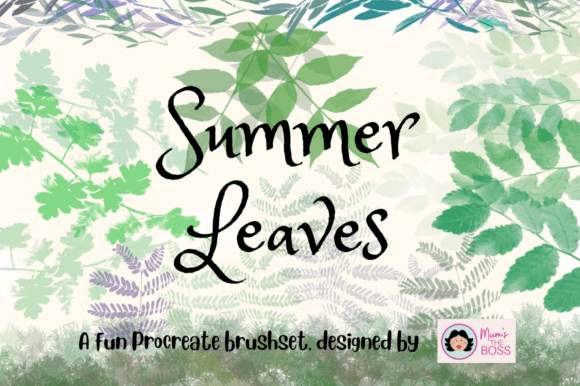
Bringing Nature to Your iPad: A Deep Dive into the Summer Leaves Procreate Brush Set
In the rapidly evolving world of digital art, finding tools that bridge the gap between technical precision and organic authenticity can be a challenge. For many artists, the sterile perfection of digital lines often lacks the warmth and unpredictability found in traditional media. This is where specialized toolsets like the Summer Leaves Procreate Brush Set become invaluable. By transforming simple photographic references into dynamic digital assets, this collection offers a unique solution for illustrators, designers, and hobbyists who wish to infuse their work with the natural beauty of foliage.
The story behind this brush set is as grounded as the subject matter itself. Every element within the collection began not as a vector shape or a hand-drawn sketch, but as a photograph of real leaves discovered during daily dog walks. This origin story is crucial because it ensures that every vein, tear, and shadow captured in the brushes carries the genuine imperfection of nature. Understanding how these brushes function—and why they are structured the way they are—can significantly enhance your workflow and elevate the quality of your digital compositions.
From Photographs to Digital Stamps: The Creation Process
To truly appreciate the utility of this brush set, one must understand the transition from physical object to digital tool. The creator did not simply trace over images; they utilized high-resolution photography of actual leaves found in local environments. This method preserves the intricate details that are often lost in stylized illustrations. Once photographed, these leaves were processed and formed into two distinct categories: bushes and stamps.
This distinction is vital for users to grasp, as it dictates how you will interact with the tool in Procreate. A "stamp" allows for precise placement. When you tap the screen, a single branch or leaf cluster appears exactly where you intend it. This is ideal for foreground elements or when you need specific compositional control. On the other hand, "bushes" are designed for continuity. As you drag your stylus across the canvas, the leaves join up with each other, creating seamless hedges, dense foliage, or flowing vines. This dual approach provides versatility, allowing artists to switch between detailed accent work and broad environmental texturing without changing tools.
Understanding Color Dynamics: Mono vs. Colored Options
One of the most sophisticated features of this brush set is its handling of color. In digital art, achieving natural variation is often tedious, requiring manual adjustment of hue and saturation for every individual element. This brush set automates that process through two primary color modes: Mono and Coloured.
The Mono option is designed for consistency and shading control. Each time you stamp or draw with a Mono brush, you receive the exact same color, but with varying levels of opacity. This is particularly useful for creating depth through layering. By overlapping semi-transparent leaves, you can build up density and shadow naturally, mimicking how light filters through a thick canopy. It gives the artist full control over the final tone while maintaining uniformity.
Conversely, the Coloured option introduces subtle, randomized variations in hue. Just like in nature, no two leaves are exactly the same shade of green. Some may lean towards yellow, others towards blue or brown, depending on their age and exposure to sunlight. When you select a base hue in Procreate, the Coloured brushes will automatically generate slight deviations from that base. This feature saves hours of manual coloring and prevents the "flat" look that often plagues digital illustrations. It creates an immediate sense of realism and vibrancy, making the foliage feel alive rather than static.
Practical Applications in Modern Digital Art
The relevance of such a specialized tool extends far beyond simple landscape painting. In modern creative workflows, efficiency and aesthetic quality are paramount. Here is how the Summer Leaves Procreate Brush Set fits into various professional and personal projects:
- Character Illustration: Adding floral crowns, leafy backgrounds, or nature-themed accessories to character portraits becomes effortless. The stamps allow for precise placement around a character’s head or shoulders without obscuring facial features.
- Pattern Design: Fashion and textile designers can use the bush brushes to create seamless repeating patterns for fabrics. The natural variation in the Coloured mode ensures that the resulting pattern does not look mechanically repetitive.
- Wedding and Event Stationery: Invitation designers often require elegant, organic borders. The ability to quickly generate lush, realistic foliage reduces the time spent on decorative elements, allowing more focus on typography and layout.
- Concept Art: Environment artists can use these brushes for rapid prototyping of forest scenes. The bush feature allows for quick blocking-in of vegetation masses, establishing mood and scale before detailing.
Common Misunderstandings About Digital Brushes
Despite their popularity, there are several misconceptions about using pre-made brush sets like this one. A common assumption is that using such tools constitutes "cheating" or limits artistic skill. However, this view overlooks the fundamental purpose of digital tools: to streamline technical execution so the artist can focus on composition and storytelling. Just as a photographer chooses a specific lens to capture a scene, a digital artist chooses brushes that best serve their vision. The skill lies in knowing how to use the tool—adjusting pressure, angle, and color—to achieve a cohesive result.
Another misunderstanding is that these brushes are only suitable for realistic art. While the source material is photographic, the output can be stylized. By adjusting the blending modes in Procreate or combining these leaves with other abstract textures, artists can create impressionistic, whimsical, or even surreal interpretations of nature. The realism of the source material provides a strong foundation that can be manipulated to fit any artistic style.
Tips for Maximizing Your Workflow
To get the most out of the Summer Leaves Procreate Brush Set, consider the following best practices:
- Layer Management: Always use separate layers for different types of foliage. Keep your background bushes on one layer and your foreground stamps on another. This non-destructive workflow allows you to adjust opacity and color balance independently.
- Color Harmony: When using the Coloured brushes, start with a muted base hue. Since the brush adds variation, starting with a highly saturated color can result in neon-looking leaves. A desaturated green or earthy brown often yields more natural results.
- Combining Modes: Do not hesitate to mix Mono and Coloured brushes in the same piece. Use Mono for shadowed areas where color variation is less visible, and Coloured for sunlit areas where hue shifts are more apparent.
- Experiment with Scale: Vary the size of your stamps. Large leaves can serve as focal points, while tiny, scattered leaves can add texture and atmosphere to the negative space.
Conclusion: Embracing Organic Beauty in a Digital World
The Summer Leaves Procreate Brush Set represents more than just a collection of digital assets; it is a testament to the power of observing the natural world. By capturing the essence of daily walks and translating it into a functional digital tool, this set invites artists to slow down and appreciate the details of nature. Whether you are a beginner looking to add some greenery to your sketches or a seasoned professional seeking to streamline your environment design, these brushes offer a blend of convenience and authenticity.
Ultimately, the value of this tool lies in its ability to remove technical barriers. Instead of struggling to paint every individual leaf, you can focus on the broader composition, the interplay of light, and the emotional tone of your artwork. In doing so, you bring a piece of the outdoors onto your screen, creating digital art that feels as warm and inviting as a walk in the park.