Summer Time Editable Text Effect: Integrating Dynamic Typography into Your Design Workflow
In the fast-paced world of digital design, efficiency and aesthetic flexibility are not just preferences; they are requirements. Whether you are a freelance graphic designer, a marketing manager for a small business, or a content creator building a personal brand, the tools you choose must adapt to your workflow rather than dictating it. This is where the Summer Time Editable Text Effect becomes an invaluable asset. It is crucial to understand from the outset that this is not a standard font file. It is a sophisticated font effect designed specifically for Adobe Illustrator. This distinction defines how it fits into your creative process, offering a level of control and scalability that static fonts simply cannot match.
Understanding the Tool: Beyond Standard Typography
Many designers initially mistake text effects for fonts. A font is a typeface family—like Helvetica or Garamond—that you install on your operating system and select in any software. The Summer Time Editable Text Effect, however, is a vector-based construction built within Adobe Illustrator. Because it is an EPS file format, it relies on the powerful rendering engine of Illustrator to maintain its integrity. This means it cannot be opened or edited with other software such as Photoshop, Canva, or Microsoft Word. While this might seem like a limitation, it is actually a strength for professional workflows. It ensures that the complex gradients, shadows, and structural elements of the effect remain crisp, editable, and fully scalable without pixelation.
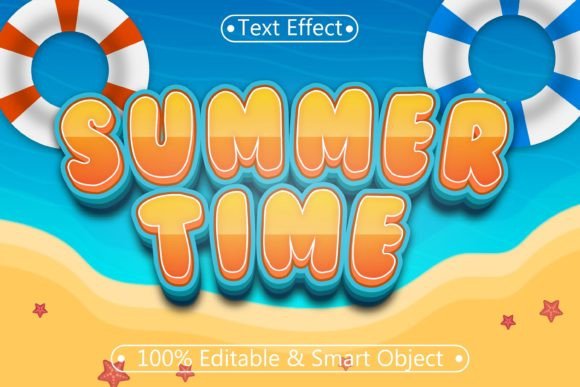
The core value proposition here is fully editable typography. When you apply this effect, you are not stuck with pre-rendered letters. You can change the text, swap the underlying font, adjust colors, and modify shapes while retaining the "summer" aesthetic—think warm gradients, sun-kissed highlights, and relaxed, inviting contours. This works with every font or shape you choose to apply it to, making it a versatile layer in your design toolkit rather than a rigid template.
Strategic Placement in Your Creative Process
To maximize the utility of the Summer Time Editable Text Effect, consider where it fits in your project lifecycle. It is most effective when integrated during the conceptualization and execution phases of visual campaigns, particularly those tied to seasonal promotions, lifestyle branding, or event marketing.
Pre-Production and Planning
Before you begin designing, assess your asset library. Having a reliable text effect ready allows you to skip the time-consuming process of building complex text styles from scratch. In a professional setting, time is money. By preparing this effect in advance, you streamline the brainstorming phase. You can quickly mock up headlines for summer sales, beach party flyers, or travel blog headers to see if the vibe matches your client’s brief. This rapid prototyping capability helps in making faster decisions about direction and tone.
Execution and Iteration
During the design phase, the ease of use becomes apparent. Because the effect is 100% editable, you can experiment freely. If a client requests a change from a bold sans-serif to a playful script, you do not need to rebuild the effect. You simply change the font attribute, and the effect updates automatically. This fluidity supports an iterative design process, allowing for multiple revisions without frustration or technical debt. It encourages creativity because the barrier to trying something new is significantly lowered.
Workflow Integration and Compatibility
Integrating this tool into your existing workflow requires an understanding of its ecosystem. Since it operates exclusively within Adobe Illustrator, it pairs best with other vector-based assets. Here is how it interacts with other components of a typical design project:
- Logo Design: Use the effect to create seasonal variations of a brand logo for limited-time campaigns. The scalability ensures it looks sharp on both business cards and billboards.
- Social Media Graphics: While the final export for social media might be a PNG or JPG, creating the source file in Illustrator allows for high-resolution exports. You can design once and resize for Instagram stories, posts, and Facebook banners without quality loss.
- Print Materials: For brochures, posters, or packaging, the vector nature of the EPS file ensures that print providers receive clean, crisp lines. There is no risk of blurry edges, which is common with rasterized text effects.
It is important to note that while the effect itself is confined to Illustrator, the final outputs can be used anywhere. Once you have finalized your text, you can copy and paste it into Adobe Photoshop or InDesign as a smart object or vector layer, maintaining editability if linked correctly. This cross-application compatibility enhances its utility in multi-step publishing workflows.
Practical Implementation Tips
To get the most out of the Summer Time Editable Text Effect, follow these practical guidelines for implementation:
- Font Selection Matters: Although the effect works with every font, the outcome varies significantly based on the typeface chosen. Thick, bold fonts will showcase the gradient and depth effects more prominently, while thin scripts may require slight adjustments to stroke weight to ensure visibility. Test different font families to find the best balance between readability and aesthetic impact.
- Color Customization: Do not feel bound by the default color scheme. The effect is fully editable, meaning you can adjust the gradient stops to match your brand guidelines. If your brand uses specific corporate colors, map the summer tones to your palette to maintain consistency while leveraging the stylistic flair of the effect.
- Layer Organization: Keep your Illustrator file organized. Name your layers clearly, especially if you are handing off files to other team members. Since the effect involves multiple vector shapes and gradients, a messy file can become difficult to navigate. Good organization ensures long-term usability and easier edits down the line.
- Scalability Testing: One of the key features is scalability. Test your design at extreme sizes. Zoom in to 400% to check for any anchor point issues, and zoom out to 10% to ensure legibility. This quality control step is vital for professional deliverables.
Enhancing Efficiency and Consistency
For entrepreneurs and small business owners who may not have a dedicated design team, tools like this bridge the gap between amateur and professional output. The Summer Time Editable Text Effect provides a consistent look that can be replicated across various materials. This consistency builds brand recognition. When customers see the same high-quality typographic style on your website, email newsletters, and physical store signage, it reinforces trust and professionalism.
Moreover, the learning curve is minimal. The description highlights that it is very easy to edit font and text. This accessibility means that even users with intermediate Illustrator skills can achieve advanced results. You do not need to be a master of mesh gradients or blend tools to create stunning typography. This democratization of high-end design techniques allows creators to focus on messaging and strategy rather than getting bogged down in technical execution.
Long-Term Value and Asset Management
Investing in high-quality, editable assets pays dividends over time. Unlike a one-off image that serves a single purpose, this effect is a reusable resource. You can archive it and pull it out for next year’s summer campaign, or adapt it for spring or autumn by tweaking the colors. Its versatility extends beyond the immediate season. With minor adjustments, the structural principles of the effect can suit various themes, making it a flexible component of your permanent design library.
When storing your files, keep the original EPS intact. Create copies for each project to avoid accidentally altering the master template. This practice ensures that you always have a clean starting point for future work. Additionally, document any specific font licenses you use in conjunction with the effect, ensuring compliance with intellectual property rights when distributing final designs.
Conclusion
The Summer Time Editable Text Effect is more than just a stylistic flourish; it is a functional tool that enhances productivity, ensures quality, and supports creative flexibility. By understanding its nature as an Illustrator-specific vector effect, you can integrate it seamlessly into your workflow. Whether you are planning a seasonal marketing push, refining your brand’s visual identity, or simply looking to elevate your design projects, this tool offers a practical, efficient, and professional solution. Embrace the ease of editable typography and let it streamline your path from concept to completion.