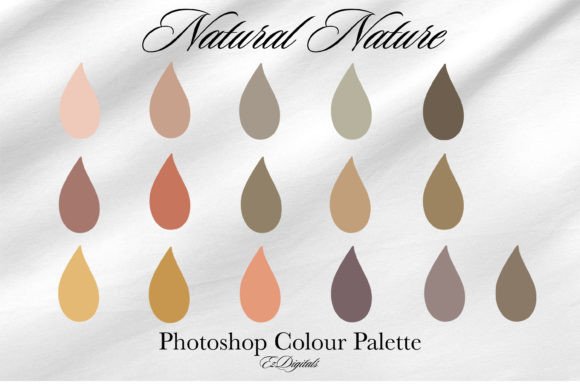
Photoshop Swatches, Natural Nature: A Practical Evaluation for Digital Artists
In the realm of digital illustration and photo manipulation, color selection remains one of the most time-consuming yet critical aspects of the creative process. For artists specializing in landscapes, environmental design, or organic subjects, achieving a harmonious palette can be challenging. This is where curated resources like Photoshop Swatches, Natural Nature come into play. Designed specifically to streamline the workflow of digital creators, this collection offers a targeted solution for those seeking authenticity in their earth-toned compositions.
This article evaluates the utility, benefits, and limitations of the Natural Nature swatch set, helping you determine if it aligns with your specific artistic goals and technical requirements.
Understanding the Natural Nature Palette
The Natural Nature Photoshop colour swatch is a specialized library containing 16 distinct shades. Unlike generic color wheels that offer infinite possibilities but little direction, this palette provides a pre-selected range of hues inspired by the organic world. The primary objective of this tool is to assist artists in creating digital nature and landscape art where colors blend together seamlessly.
The sixteen shades are not random; they are curated to represent various elements found in natural environments, such as foliage, soil, sky gradients, and water reflections. By limiting the initial choice to these specific tones, the swatch aims to reduce decision fatigue and ensure that the resulting artwork maintains a cohesive visual identity. For many digital painters, the struggle is not just picking a color, but picking a color that works well with its neighbors. This swatch addresses that friction point directly.
Why Consider a Curated Swatch Set?
Artists often debate the merits of using pre-made palettes versus creating custom ones from scratch. There are several practical reasons why a resource like Photoshop Swatches, Natural Nature might be valuable to your workflow:
- Efficiency: Manually sampling colors from reference photos or adjusting hue/saturation sliders for every brushstroke is inefficient. A ready-made swatch allows for rapid color picking, significantly speeding up the blocking-in phase of a painting.
- Color Harmony: One of the biggest challenges for beginners and intermediates is maintaining color harmony. These 16 shades are designed to complement each other, reducing the risk of jarring or unrealistic color clashes in landscape scenes.
- Consistency: For artists working on a series of pieces or a long-term project, using a standardized palette ensures visual consistency across different illustrations.
Benefits and Practical Applications
The core benefit of the Natural Nature swatch lies in its specialization. It is not a general-purpose palette; it is engineered for a specific niche. If your portfolio focuses on forests, mountains, meadows, or coastal scenes, this tool can serve as a reliable foundation. The seamless blending capability mentioned in its description suggests that the values and saturation levels of the 16 shades have been balanced to transition smoothly from light to dark, or from warm to cool tones.
Consider a scenario where you are painting a misty forest at dawn. Instead of guessing which green mixes well with a desaturated blue-gray, you can select adjacent colors from the swatch. This reduces the cognitive load, allowing you to focus more on composition, lighting, and texture rather than color theory mechanics. Furthermore, for digital artists looking to take their Photoshop art to the next level, mastering the use of restricted palettes is a key skill. This swatch serves as both a tool and a learning aid, demonstrating how a limited number of colors can create depth and variety.
Tradeoffs and Limitations
While the advantages are clear, it is essential to approach this tool with realistic expectations. The most significant limitation is the fixed number of colors. With only 16 shades, the palette is inherently restrictive. For complex scenes requiring vibrant flowers, exotic animals, or dramatic sunset skies with high-saturation oranges and purples, this specific set may feel insufficient.
Additionally, reliance on pre-made swatches can potentially stifle creative exploration if used exclusively. Artists who depend solely on these 16 colors may find their work becoming repetitive or lacking in unique personal flair. It is crucial to view the Photoshop Swatches, Natural Nature as a starting point or a base layer, rather than a rigid constraint. Professional workflows often involve expanding upon a base palette, adding custom mixed colors to address specific lighting conditions that the standard swatch may not cover.
Ideal Use Cases
This swatch set is a strong fit for specific types of projects and users:
- Beginner Landscape Painters: Those still learning color theory will benefit from the safety net of pre-harmonized colors.
- Speed Painting Challenges: When time is limited, having a go-to nature palette eliminates the setup phase.
- Concept Art for Environments: Game developers and illustrators creating mood boards for natural settings can use these shades to quickly establish tone and atmosphere.
- Digital Collage: Artists combining photographic elements often need neutral, natural tones to blend disparate images together seamlessly.
When to Consider Alternatives
There are situations where alternative tools or methods may be more appropriate. If your work involves stylized, non-realistic art with neon or pastel aesthetics, a natural earth-tone palette will likely hinder rather than help. In such cases, broader, more vibrant swatch libraries or custom-generated palettes based on specific color theories (such as complementary or triadic schemes) would be more effective.
Furthermore, advanced colorists who have developed a keen eye for subtle value shifts may find 16 colors too broad or too limited depending on the nuance required. These artists might prefer generating dynamic palettes using Adobe Color’s extraction tools from reference photography, allowing for infinite customization tailored to each unique piece.
Making the Decision
To determine if Photoshop Swatches, Natural Nature is right for you, evaluate your current pain points. Do you spend excessive time mixing greens and browns? Do your landscape paintings often look disjointed or overly saturated? If so, this tool offers a structured approach to solving those issues. However, if you pride yourself on unique, unconventional color choices or work primarily in urban or sci-fi genres, this specific nature-focused set may have limited utility.
Ultimately, the value of this swatch lies in its ability to bring digital art to life through efficient, harmonious color application. It is a practical asset for any digital artist’s toolkit, provided it is used with an understanding of its scope. By integrating these 16 beautiful shades into your workflow, you can streamline your process and enhance the naturalistic quality of your digital landscapes, allowing you to focus on the artistic expression that truly matters.